
This quick guide introduces how to use Skype for Business.
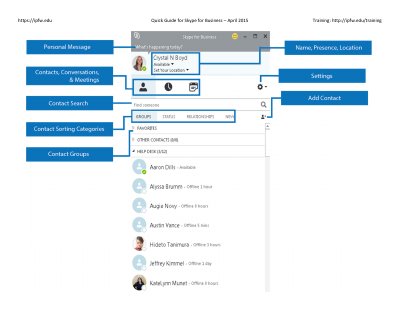
This document serves as a quick guide for Skype for Business, providing instructions on basic usage such as finding contacts, managing presence, and conducting instant messaging and audio/video calls. It details how to handle incoming requests and switch between active conversations.
Only one of the devices will receive new incoming messages, calls, etc. To avoid this, sign out of the device(s) you are not using.
Point to the camera icon and click 'End Video' to stop seeing all video, though you will still have audio.
Click 'More Options' and then click 'Start Recording' to begin recording the meeting.