
This document introduces the functions of Skype for Business, including IM&P, A&VC, EV.
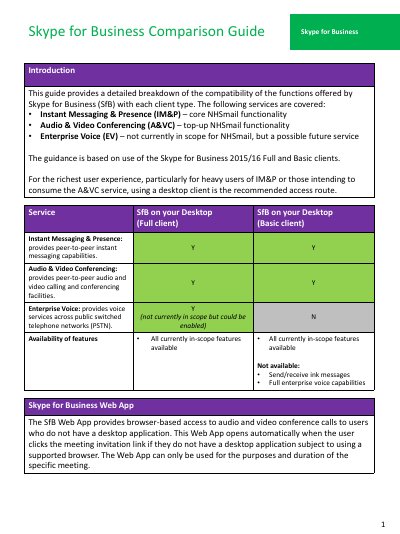
This document serves as a comparison guide for Skype for Business functions, specifically analyzing the compatibility of features offered by the Full client versus the Basic client. It covers core services including Instant Messaging & Presence (IM&P), Audio & Video Conferencing (A&VC), and Enterprise Voice capabilities within the context of NHSmail scope.
| Minimum OS for Skype for Business 2016 | Windows 7 or later |
|---|---|
| Minimum OS for Lync 2010 | Windows 7 or later |
| Minimum OS for Lync 2011 for Mac | OS 10.5.8 or later |
| Minimum iOS version | IOS 8 or later |
The guide recommends using a desktop client for the richest user experience, particularly for heavy users of instant messaging and presence or those intending to consume audio and video conferencing services.
Skype for Business 2016 supports Windows 7 or later operating systems.
The minimum supported version for Skype for Business on iPhone or iPad is 4.1.6554.*.