
Skype User Guide, including downloading, login, making calls etc.
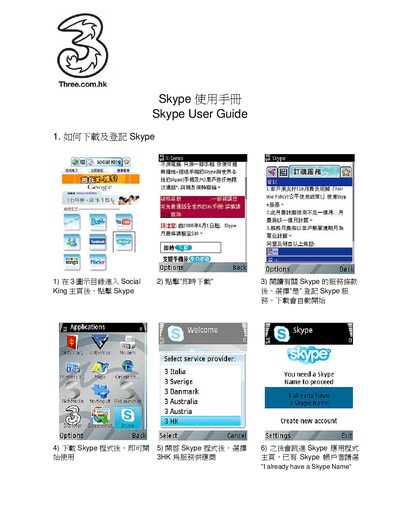
This user manual provides detailed instructions for using Skype, covering download and installation, account registration, making calls, and adding contacts. It includes both Chinese and English instructions to help users of either language.
The guide is organized into four main sections: downloading and logging in, creating a new account, making a call, and adding a contact. Each section lists the required actions with screen‑click steps and options. This manual is written in Chinese.
Open the Social King portal, click “Skype”, then select “Download now”. Confirm the download and the installer will start automatically.
In the Skype main page, click “Create new account”, accept the terms, enter a desired Skype name and password, then click “OK” and “Done”.
Select a contact from the list, choose “Options”, then click “Call” and “Select” to start the call.
Open the contact list, click “Options”, choose “Add a contact”, enter the person's Skype name, and click “Add”.