
This is a user manual for Royaltek RPPJ--22000000, which mainly introduces the appearance, use and function of the product
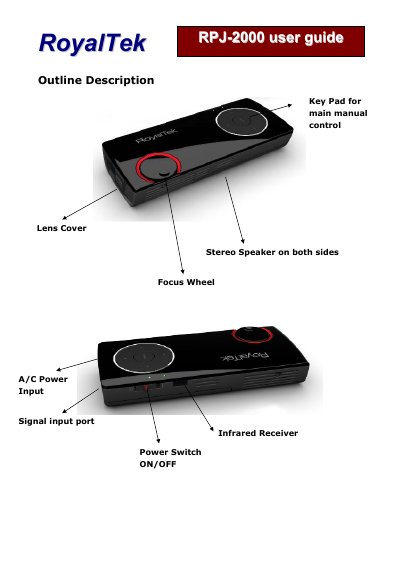
This user manual guides users through installing the battery, connecting accessories like RCA and VGA cables, and using the remote control. It details the key pad functions for volume, input mode, and menu navigation.
The manual also covers on-screen display (OSD) settings including brightness, contrast, color, gamma, and input luminance adjustments. Utility functions like sleep timer, key LED time, and language selection are explained, along with firmware version information.
| Input Luminance | 100 |
|---|---|
| Volume | 0 - 100 |
| Brightness | 0 - 100 |
| Contrast | 0 - 100 |
| Saturation | 0 - 100 |
| Hue | 0 - 100 |
| Sharpness | 0 - 100 |
| GAMMA Mode | 0 – Mode 15 |
| Firmware Version | 0.6.9 |
Slide the battery cover, insert the battery, then replace and slide the cover until you hear a click.
Up/Luminance selection, Down/CVBS/PC mode, Left/Volume down, Right/Volume up, MENU/Exit, Suspend/Resume, Mute.
English and Traditional Chinese.