
This is the installation guide for Aruba Instant On AP17 wireless access point.
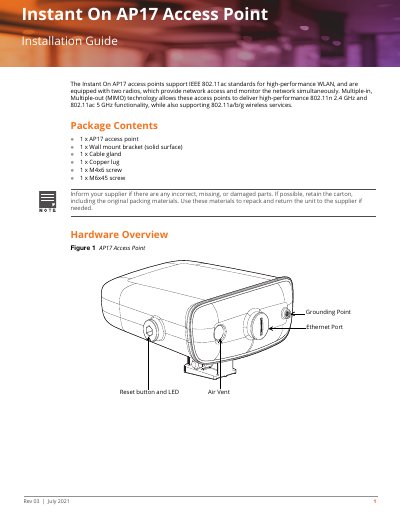
This document provides installation instructions for the Aruba Instant On AP17 access point. It details the package contents, hardware overview, and specific steps for identifying installation locations and planning the deployment environment to ensure optimal RF coverage.
| Wireless Standards | IEEE 802.11ac, 802.11n, 802.11a/b/g |
|---|---|
| Power Supply | 802.3af PoE |
| Max Power Consumption | 12.95W |
| Operating Temperature | -40°C to +50°C |
| Operating Humidity | 5% to 93% non-condensing |
Press and hold the reset button for more than 10 seconds during normal operation, or hold it for 15 seconds while powering up.
Outdoor rated Cat5e or above Ethernet cable should be used for all outdoor wired Ethernet connections.
The equipment should be operated with a minimum distance of 13.78 inches (35cm) between the radiator and your body.