
This Operator's Guide provides basic operating procedures for this equipment. For more detailed information see the Operator's Manual.
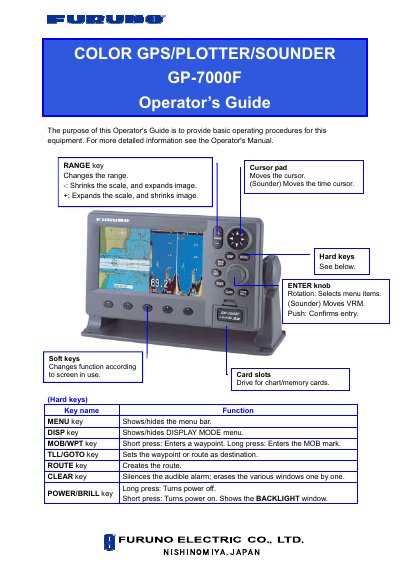
This guide explains how to operate the Garmin GP-7000F, a color GPS/plotter/sounder. It covers hard key functions, cursor pad use, sounder settings, and alarm configuration. The guide is designed for basic operation and includes steps for entering waypoints, creating routes, adjusting brightness, and setting arrival alarms. It also details sounder modes and noise suppression options.
Operate the cursor pad to place the cursor at the desired position, then press the MOB/WPT key, and finally press the ENTER knob.
Press the MENU key, choose ALARMS, select ARRIVAL ALARM, rotate the ENTER knob to choose the value, enter the alarm range, and press ENTER.
Press the BRILL key to show the BACKLIGHT window, rotate the ENTER knob to adjust brilliance, then push ENTER to close.