
This document describes the setup steps of JVC KY-PZ200/400 PTZ cameras, including connecting to the network, setting IP address, and upgrading firmware.
This guide helps users configure the JVC KY-PZ200/400 PTZ camera for network use, including setting IP addresses, updating firmware, and adjusting video settings. It covers recommended configurations for NDI HX and REMI protocols, as well as image settings via Web GUI or remote control.
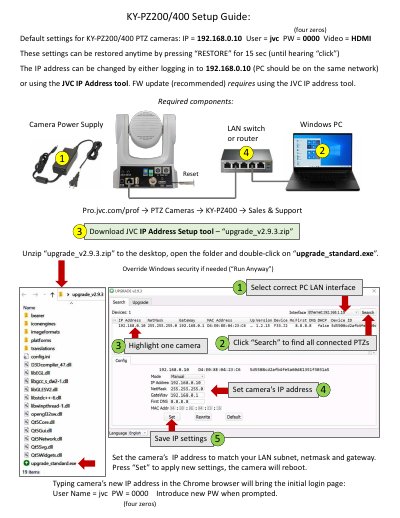
The guide includes instructions for using the JVC IP Address Setup tool to configure the camera’s network settings and update firmware. Reboots are required after applying certain settings, such as NDI HX or REMI configurations, to ensure changes take effect.
Set the camera’s IP address to match your LAN subnet, netmask and gateway. Press “Set” to apply new settings, the camera will reboot.
The default IP address is 192.168.0.10.