
DC2303 is a demo board for the high performance DAC LTC2000 and LTC2000A, supporting 16-bit/14-bit/11-bit parts, supports 2.5Gsps to 2.7Gsps sampling rates, suitable for applications requiring differential DC coupled outputs.
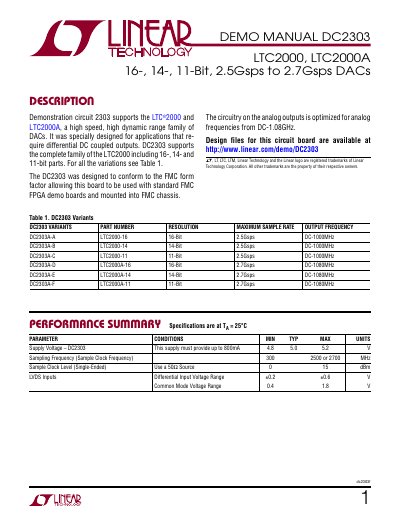
This document provides setup and operation instructions for the DC2303 demonstration circuit, designed to evaluate Linear Technology's LTC2000 and LTC2000A DACs. It details hardware connections, jumper settings, power requirements, and software use with the L TDACGen tool. The board is compatible with FMC FPGA boards like the Xilinx KC705 and includes SMA connectors for differential outputs and sample clock input.
The manual covers quick-start procedures, including connecting the board, applying power, and using the software to generate waveforms. It also addresses performance considerations, such as noise and impedance, and provides specifications for supply voltage, sampling frequency, and output characteristics.
| Supply Voltage | 4.8V to 5.2V |
|---|---|
| Sampling Frequency | 300 MHz to 2700 MHz |
| Differential Input Voltage Range | ±0.2V to ±0.6V |
| Output Frequency | DC-1000MHz or DC-1080MHz |
Use a 50Ω source with a 0dBm clock signal, though 15dBm is recommended for best phase noise and jitter performance.
Use the L TDACGen software, available for free at http://www.linear.com/designtools/software/#DAC, to generate waveforms and load them into the FPGA.