
This manual provides instructions for installing Apexi G2, G4, and G5 wideband air/fuel ratio (WBO2) gauges and features charts and diagrams illustrating how to connect the wires and components.
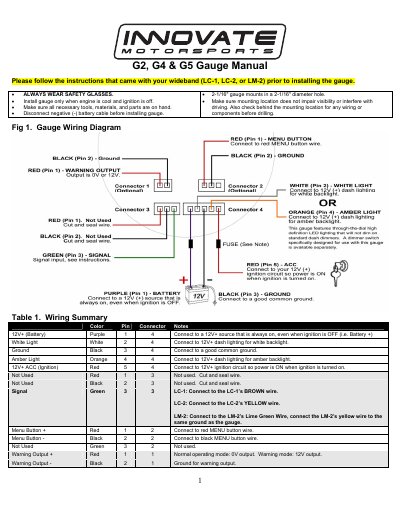
This manual provides installation instructions for the G2, G4, and G5 wideband air/fuel ratio gauges. It details safety precautions, mounting requirements, and a comprehensive wiring summary for connecting the gauge to a 12V power source, ground, and compatible wideband controllers (LC-1, LC-2, or LM-2). The document also covers optional wiring for a remote menu button and external warning outputs.
| Mounting Hole Diameter | 2-1/16" |
|---|---|
| Recommended Wire Gauge | 20 AWG stranded or heavier |
| Recommended Fuse Rating | 1 Amp |
| Warning Output Current | 500mA |
The gauge is designed to work with the LC-1, LC-2, or LM-2 wideband controllers.
No, the remote menu button is optional and only necessary if you wish to use the RECALL and WARNING features.
To turn the low warning OFF, set the low warning set point to 0% or 2% scale.