
This manual introduces the installation and use of the Automated Thermal Cycler (ATC) System, including product description, package contents, quick reference.
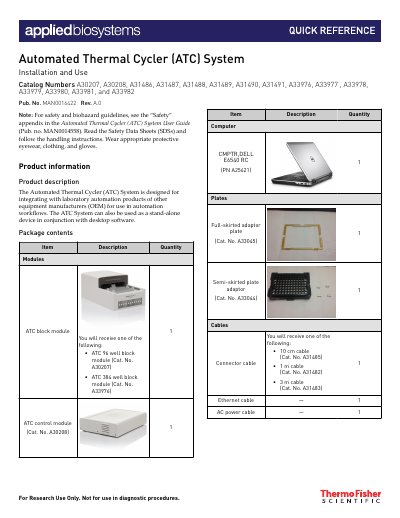
This manual provides instructions for installing and using the Automated Thermal Cycler (ATC) System, which is designed for integration with laboratory automation products or use as a standalone device. The system includes various block modules (96-well and 384-well) and control modules that connect via Ethernet to a computer running the ATC Demo software.
The guide details hardware setup, including connecting power and Ethernet cables, and installing optional full-skirted or semi-skirted plate adaptors. It also explains how to launch the desktop software, connect to the instrument, and execute thermal cycling protocols using the Protocol Editor.
| Block Module Types | ATC 96 well block module, ATC 384 well block module |
|---|---|
| Ramp Rate | Peak block ramp rate of 3.5C/s |
| Initialization Time | Approximately 1.5 minutes |
The peak block ramp rate is 3.5C/s, which corresponds to 100% in the software settings.
It takes approximately 1.5 minutes for the ATC to initialize before it can connect to the software.
Yes, the ATC System can be used as a stand-alone device in conjunction with desktop software.