
This document provides information on product safety and RF exposure compliance for the Motorola Mag One™ radio. It emphasizes that the radio is restricted to occupational use only to comply with FCC RF energy exposure requirements. The document includes RF energy awareness information and operating instructions to ensure compliance with RF energy exposure limits. It also provides a list of Motorola-approved antennas, batteries, and other accessories.
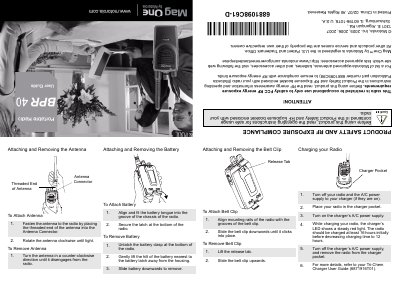
This document serves as the user manual for the Motorola Mag One radio, providing essential information on product safety and RF exposure compliance. It details the proper procedures for attaching and removing the antenna, battery, and belt clip, as well as charging the device using the Tri-Chem charger.
| Charging Time (Initial) | 16 hours |
|---|---|
| Charging Time (Subsequent) | 12 hours |
| Battery Type | NiMH 1200mAH / Li-Ion 1500mAH |
| Frequency Range (Antenna) | 150-174MHz / 450-470MHz |
The radio should be charged for at least 16 hours initially before the charging time decreases to 12 hours.
The Red LED indicates that the radio is transmitting.
The Orange LED indicates that the radio is receiving with PL/DPL enabled.
No, the radio does not support the VOX feature; the accessory switch must be set to 'PTT'.