
Texas Instruments CC2430-CC2591EMK Quick Start Guide

This document is about the SWRU171A August 2009 CC2430-CC2591EMK Quick Start Guide. The guide provides information about the contents of the CC2430-CC2591EMK kit and how to use it, including performing packet error rate tests, selecting channels, selecting modes, setting gain and output power, etc.
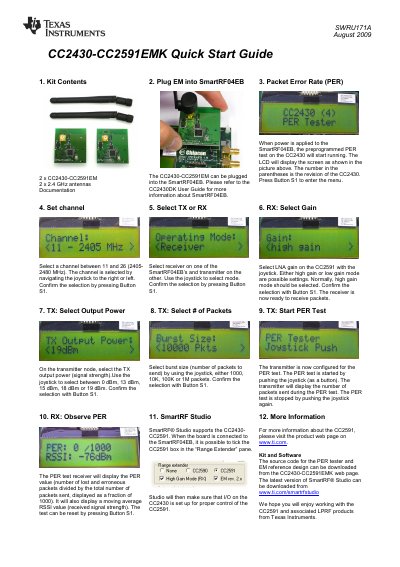

Texas Instruments CC2430-CC2591EMK Quick Start Guide - cover page
Brand
Texas Instruments
Category
Wireless connection
Document type
Quick Start Guide
Language
English
Pages
2
File format
PDF
File size
479 KB
Published
07 April, 2013
Updated
28 September, 2023
MD5 checksum
079DE9E00335195F33BA0BDF1BA4FC57

About this manual

The document describes the contents of the CC2430-CC2591EMK kit, which includes two CC2430-CC2591EM modules and documentation. It details how to plug the module into a SmartRF04EB board and run preprogrammed tests.

What's inside

  • Kit Contents
  • Plug EM into SmartRF04EB
  • Packet Error Rate (PER)
  • Set channel
  • Select TX or RX
  • RX: Select Gain
  • TX: Select Output Power
  • SmartRF Studio

Frequently asked questions

What channels can be selected for the CC2430-CC2591EMK?

Users can select a channel between 11 and 26 (2405-2480 MHz).

What output power options are available for the transmitter?

The transmitter allows selection of signal strength at 0 dBm, 13 dBm, 15 dBm, 18 dBm or 19 dBm.

How many packets can be selected for a burst size?

The number of packets to send can be set to 1000, 10K, 100K or 1M.

Download PDF (479 KB)

More Texas Instruments Manuals


View all Texas Instruments manuals →