
This is the tuning manual of Philips OM8371-CN1 TV. It introduces the TV's technical specifications, main features, optional functions, overall tuning process, main power +B setting, NICAM AFT tuning, factory tuning and settings.
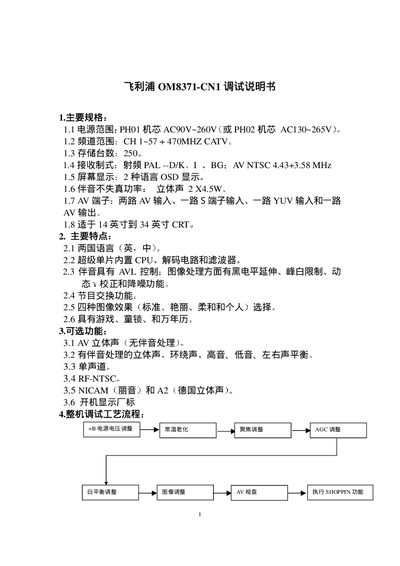
This manual describes the main specifications of the Philips OM8371-CN1 CRT television, including power range, channel range, storage capacity, reception standards, supported screen sizes, language options, and image effects. It also outlines optional features such as various audio modes and program swapping.
The document details the factory debugging workflow, covering how to enter factory mode, perform white‑balance and image adjustments, configure service pages (SERVICE0‑7), set factory logo display, and use automatic debugging via the BUS OPEN state. Step‑by‑step instructions for each adjustment are provided along with EEPROM address tables for calibration data. This manual is written in Chinese.
| Power range | AC90V~260V (PH01) or AC130~265V (PHO02) |
|---|---|
| Channel range | CH 1~57 + 470 MHz CATV |
| Storage capacity | 250 stations |
| Reception standards | PAL‑DIK, I, BG; AV NTSC 4.43+3.58 MHz |
| Supported screen size | 14‑34 inch CRT |
| Language options | English and Chinese |
| Image effects | Standard, Vivid, Soft, Personal |
Use the factory remote or press the menu key on a normal remote, then enter password 6483 to switch to FACTORY state.
Press the key twice to enter B/W BALANCE state, select the item with the POS key, and use the +/- keys to fine‑tune the value until satisfied.
After entering factory mode, cancel the "no‑signal blue screen" and the "no‑signal 10‑minute auto‑shutdown" functions; the EEPROM will retain the FACTORY state.