
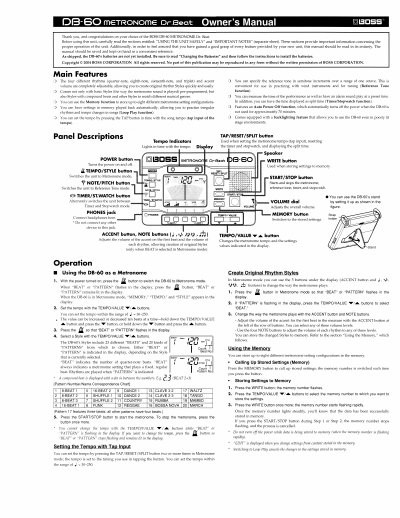
BOSS DB-60 Metronome Owner's Manual


BOSS DB-60 Metronome Owner's Manual - cover page
Brand
BOSS
Category
Other
Document type
User Manual
Language
English
Pages
4
File format
PDF
File size
785 KB
Published
10 August, 2012
Updated
27 August, 2012
MD5 checksum
48BA0C9EAAE2F4DD313CD5B3DCF2FA87

About this manual

This manual provides instructions for the BOSS DB-60 Metronome, a device featuring adjustable rhythms, accent volume, and multiple musical styles. It details how to operate the unit in Metronome mode, including setting tempo via tap input and creating original rhythm styles.

What's inside

  • Main Features
  • Panel Descriptions
  • Using the DB-60 as a Metronome
  • Setting the Tempo with Tap Input
  • Create Original Rhythm Styles
  • Using the Memory
  • Using Loop Play
  • Playing the Reference Tone
  • Using the DB-60 as a Timer
  • Using the DB-60 as a Stopwatch

Specifications

Memory Capacity8 configurations

Frequently asked questions

How do I store settings to memory?

Press the WRITE button, select the memory number with TEMPO/VALUE buttons, and press WRITE again until the number lights steadily.

How many different metronome setting configurations can be stored in memory?

You can store up to eight different metronome setting configurations in the memory.

Download PDF (785 KB)

More BOSS Manuals


View all BOSS manuals →