
This document discusses specific hardware issues when implementing a system design that incorporates ADSP-TS101S TigerSHARC® processors.
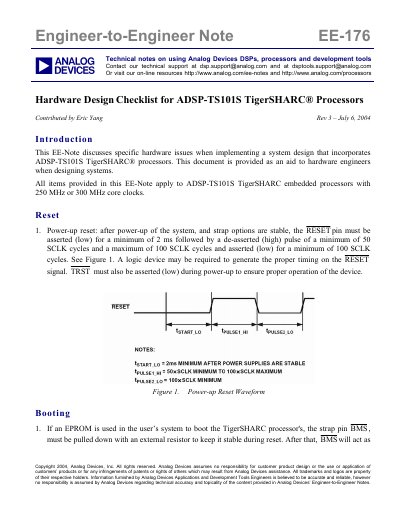
This document serves as an engineer-to-engineer guide for designing hardware systems incorporating the ADSP-TS101S TigerSHARC processor. It outlines critical considerations for power-up reset sequences, boot mode selection, and clock distribution strategies to ensure deterministic operation. The text emphasizes the importance of deriving system clocks from a single source and managing clock jitter within 100 ps tolerance.
Key sections detail power supply requirements, specifically the need for clean analog supplies (VDD_A) and proper bypassing techniques using low-inductance capacitors. The guide also covers JTAG port setup for multiprocessor systems, strap pin definitions for configuring boot modes and interrupt sensitivity, and cluster bus configuration for multiprocessing environments.
| Core Clock Frequency | 250 MHz or 300 MHz |
|---|---|
| Power-up Reset Low Time | 2 ms minimum |
| Power-up Reset High Time | 50 to 100 SCLK cycles |
| Power-up Reset Low Time (Second) | 100 SCLK cycles minimum |
| LCLK/SCLK Jitter Tolerance | 100 ps |
The required sequence is to provide VDD (and VDD_A) before VDD_IO.
All strap pins must be set to the desired state during reset.
The default setting is 0, which boots from EPROM immediately after reset.