
Sharp HT-DD5000 Home Theater System Quick Guide

This is a quick guide for HT-DD5000 home theater system, introduces how to use the remote control and how to connect the system.
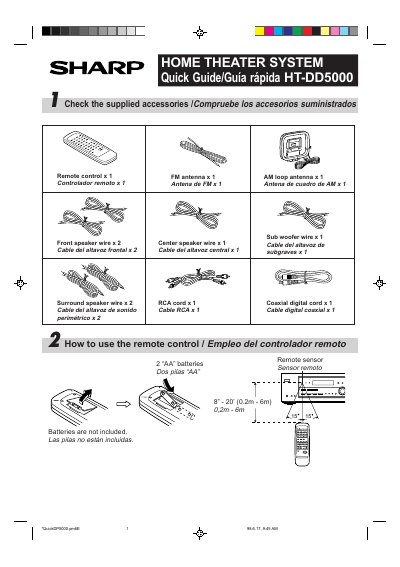

Sharp HT-DD5000 Home Theater System Quick Guide - cover page
Brand
Sharp
Category
Player
Document type
User Manual
Language
English
Pages
4
File format
PDF
File size
131 KB
Published
03 August, 2012
Updated
30 September, 2023
MD5 checksum
19E7F520D873225B19763E4A8F2804A8

About this manual

This document is a quick guide for the Sharp HT-DD5000 home theater system. It lists the included accessories, such as the remote control, FM antenna, and various speaker wires. The guide provides instructions on how to use the remote control, including battery installation and sensor distance.

What's inside

  • Included Accessories
  • Remote Control Usage
  • Connecting the System
  • Power On/Off
  • Switching Audio/Video Signals
  • Listening to the Radio

Frequently asked questions

How do you turn the power on or off?

As long as the STAND-BY indicator is lit, you can turn the power on or put the unit in the stand-by mode using the POWER button on the remote control.

What batteries are required for the remote control?

The remote control requires two 'AA' batteries.

What power rating does this system require?

The system requires 120 V of AC at 60 Hz.

Download PDF (131 KB)

More Sharp Manuals


View all Sharp manuals →