
This document explains why static testing is insufficient for characterizing high-speed analog-to-digital (A/D) converters operating at sampling rates exceeding 10 MHz. It highlights that dynamic stress reveals hidden shortcomings such as missing codes, nonmonotonic conditions, and linearity errors.
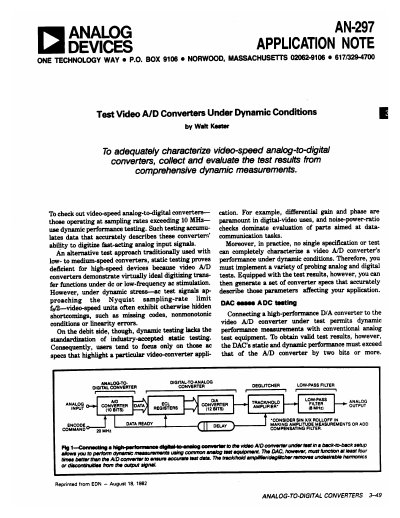
The text details a back-to-back test setup using a high-performance D/A converter to drive the A/D converter under test. It specifies requirements for the D/A converter's performance relative to the A/D unit and describes the use of deglitchers and track/hold amplifiers to remove unwanted harmonics and glitches during dynamic measurements.
Static testing proves deficient because these units demonstrate ideal transfer functions under DC or low-frequency AC stimulation, but exhibit hidden shortcomings like missing codes and linearity errors under dynamic stress.
The D/A converter's static and dynamic performance must exceed that of the A/D converter by two bits or more to obtain valid test results.
A deglitcher removes unwanted harmonics caused by DAC glitches or analog-output discontinuities by switching to Hold mode immediately before the DAC updates and Track mode afterward.