
Dell 3400MP Projector Setup Guide

This manual explains how to set up the Dell 3400MP projector.
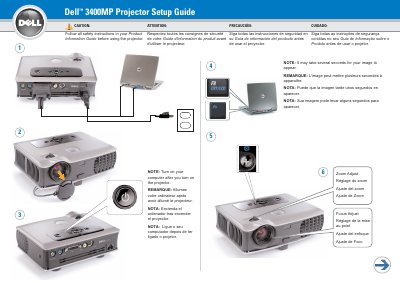

Dell 3400MP Projector Setup Guide - cover page
Brand
DELL
Category
Projector
Document type
User Manual
Language
English
Pages
2
File format
PDF
File size
1.3 MB
Published
12 July, 2012
Updated
30 September, 2023
Model
3400MP
MD5 checksum
3566F2B3991356CEDDEF1B248B4961EE

About this manual

This guide covers essential safety precautions and operational notes for the Dell 3400MP projector. It advises users to read the full Information Guide before use, noting that images may take several seconds to appear after turning on the device. The document also specifies that a computer should be turned on after the projector is powered up.

What's inside

  • Safety Instructions
  • Image Appearance Note
  • Computer Power Sequence
  • Remote Control Buttons
  • USB Cable Connection

Frequently asked questions

Is a USB cable required to use the remote control?

Yes, the USB cable must be connected to use Next Page and Previous Page on the remote control.

Download PDF (1.3 MB)

More DELL Manuals


View all DELL manuals →