
CAL ® Operating Instructions
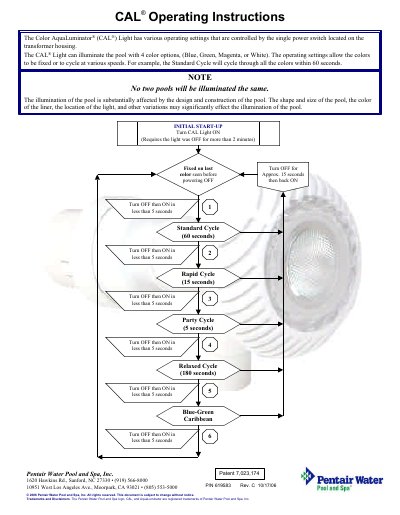
The document provides operating instructions for the Color Aqualuminator (CAL) Light. It explains that the device is controlled by a single power switch on the transformer housing and can illuminate pools in four colors: Blue, Green, Magenta, or White.
The guide details how to set specific color modes versus cycling modes based on how long the light has been off before being turned back on. For example, turning it off for more than 2 minutes allows fixing a single color, while shorter intervals trigger various cycles like Standard (60 seconds), Rapid (15 seconds), or Relaxed (180 seconds).
The light can illuminate the pool with four color options: Blue, Green, Magenta, or White.
The Standard Cycle cycles through all the colors within 60 seconds.
You must turn the light off for more than 2 minutes before turning it back on to see the color seen before powering off.