
Pentair IntelliTouch Valve Module Installation Instructions

This document introduces the installation instructions of IntelliTouch® Valve Module.

Pentair IntelliTouch Valve Module Installation Instructions - cover page
Brand
Intel
Category
Other
Document type
Installation Guide
Language
English
Pages
2
File format
PDF
File size
529 KB
Published
12 July, 2012
Updated
30 September, 2023
MD5 checksum
95EE481ECF338F557DCBE733E2CF76E9

About this manual

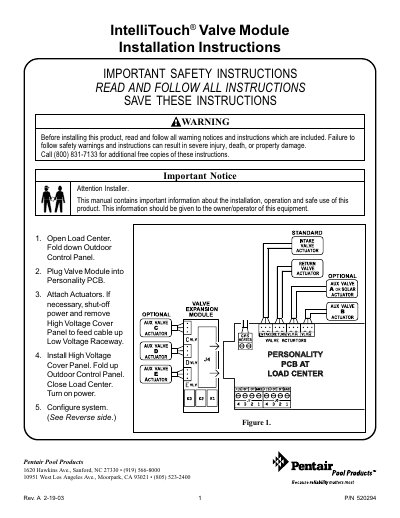
This document provides installation instructions for the Pentair IntelliTouch Valve Module. The module is installed in the load center by plugging it into the Personality PCB and attaching actuators. Users must follow specific steps to open the load center, connect the module, and secure the high voltage cover before turning on power.

What's inside

  • IMPORTANT SAFETY INSTRUCTIONS
  • Standard Installation Steps
  • Configuring Valve Actuators
  • Auxiliary Valve Actuators
  • Solar Heating Configuration
  • FEATURE Circuits

Frequently asked questions

How many additional valve actuators can the system accommodate with the Valve Module?

With the addition of the Valve Module circuit board, the system will accommodate up to three additional actuators.

Can valve actuators be controlled by FEATURE circuits?

Yes, valve actuators can be controlled by FEATURE circuits, which allows AUX circuits to be reserved for high voltage relays for pumps and lights.

Download PDF (529 KB)

More Intel Manuals


View all Intel manuals →