
This document describes the features and characteristics of the Nintendo 3DS system, including the 3D screen, Circle Pad, HOME Button, etc.
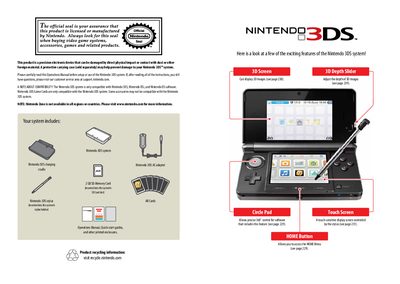
This document serves as the official Operations Manual for the Nintendo 3DS handheld game console. It provides comprehensive instructions on setting up the device, including initial configuration, internet connectivity via Wi-Fi, and system updates. The guide details how to use core features such as the touch screen, stylus, Circle Pad, and the unique 3D depth slider without special eyewear.
| Compatible Software | Nintendo 3DS, Nintendo DSi, and Nintendo DS software |
|---|
No, the Nintendo 3DS allows you to experience 3D images without the need for special eyewear.
Yes, the system can play Nintendo DS and Nintendo DSi software in addition to its own titles.
SpotPass allows the system to automatically communicate with a nearby wireless LAN access point to transmit data.