
Key facts
- Manuals
- 34
- Categories
- 3
- Languages
- FR · EN
- Last added
- 2012-07-05
Featured Nintendo manuals
Nintendo Wi‑Fi Connection User Manual
The Nintendo Wi‑Fi Connection manual provides step‑by‑step instructions for connecting a Nintendo DS to Wi‑Fi networks, both at home and at public hotspots. It describes quick configuration, manual setup, and the AOSS one‑touch secure system.
Key sections include an introduction, quick setup, AOSS configuration, manual configuration, troubleshooting, and the contract governing the service. The document also outlines required network parameters such as SSID, WEP key, IP address and related settings. This manual is written in French.
Covers: INTRODUCTION · JOUER PAR LE BIAIS DE BORNES WI‑FI · JOUER CHEZ SOI – Configuration Rapide · JOUER CHEZ SOI – AOSS · JOUER CHEZ SOI – Configuration Manuelle · NINTENDO Wi‑Fi USB CONNECTOR
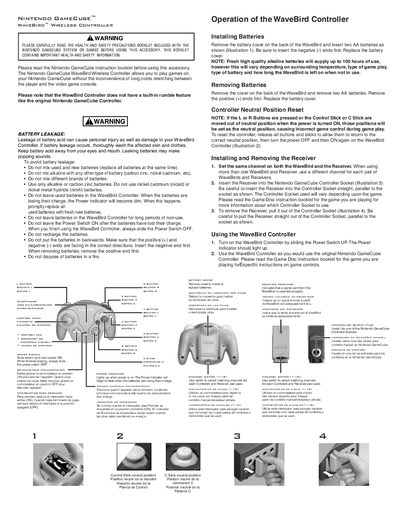
Nintendo WaveBird Wireless Controller User Manual
The WaveBird Wireless Controller manual provides safety precautions, battery installation steps, and instructions for pairing the controller with its receiver. It explains how to select matching channels, operate the controller, and reset neutral positions.
Additional sections cover troubleshooting tips, FCC and Industry Canada compliance information, and warranty details, helping users resolve common issues and understand the product’s regulatory status.
Covers: Safety Precautions · Battery Installation · Receiver Installation · Channel Selection · Using the Controller · Neutral Position Reset
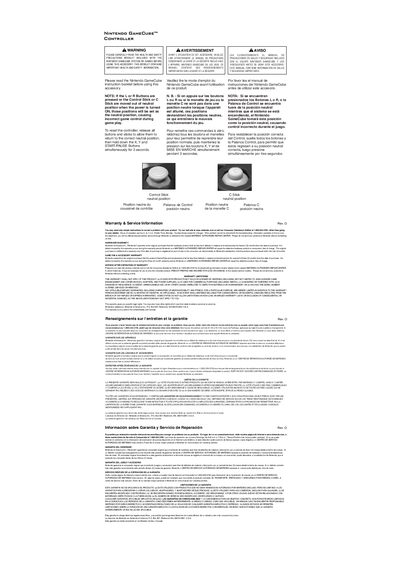
Nintendo GameCube Controller User Manual – Control Stick Neutral Position
The document provides safety and health precautions for using the Nintendo GameCube controller and describes the neutral positions for the control stick and C‑stick. It warns that if the sticks are out of neutral when the console powers on, that position will be saved as the neutral setting.
To reset the controller, release all buttons and sticks, then hold X, Y, and START for three seconds. The manual also includes hardware and accessory warranty information and instructions for service after warranty expiration.
Covers: Control Stick neutral position · C Stick neutral position · Health and Safety Precautions · Resetting the controller · Hardware Warranty · Game Pak & Accessory Warranty
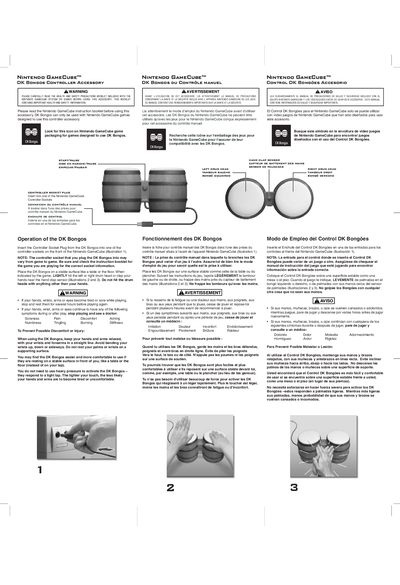
Nintendo GameCube DK Bongos User Manual
The DK Bongos controller accessory for the Nintendo GameCube lets you play rhythm games by tapping the left and right drum heads or clapping your hands near the sensor. The manual explains how to insert the controller plug into a GameCube controller socket, how to position the bongos on a stable surface, and how to use light taps for optimal response.
Safety precautions emphasize proper hand posture, avoiding excessive force, and taking breaks to prevent fatigue or injury. The document also provides warranty details, service contact information, and instructions for obtaining repair assistance.
Covers: Health and Safety Precautions · Operation of the DK Bongos · Installation Instructions · Warranty and Service Information · Customer Support
Latest Nintendo manuals
NINTENDO DS Unwound OF Future Manual
This document is an instruction manual that introduces the use of Nintendo game consoles, as well as health and safety precautions.
NINTENDO DS PokeMON WHITE VERSION Manual
This document is about the health and safety precautions for Nintendo game consoles.
NINTENDO DS MARIO DONKEY KONG MINI-LAND MAYHEM Manual
Need help with installation, maintenance, or service? Contact Nintendo Customer Service support.nintendo.com or call 1-800-255-3700 MON.-SUN., 6:00 a.m. to 7:00 p.m., Pacific Time (Times subject to change)
NINTENDO DS MARIO LUIGI BOWERE'S INSIDE STORY Manual
This booklet provides important health and safety information about using your Nintendo Switch hardware system, game card, or accessory.
NINTENDO DS GOLoen Sup DARK DAWN Manual
This is a Nintendo game console instruction manual, which provides operating instructions, safety warnings, and maintenance information
NINTENDO DS GAME WATCH COLLECTION Manual
This document is about the safety instructions for Nintendo game console
NINTENDO DS FLASH FOCUS Manual
This document is an instruction booklet for Nintendo gaming consoles. It introduces the operating methods, maintenance methods and precautions of the gaming consoles.
NINTENDO DS FIRE EMBLEM Shadow Dragon Manual
This document is an instruction booklet for Nintendo gaming console, providing assistance with installation, maintenance, and service. It contains important health and safety information, particularly warnings regarding light flashes and seizures.
NINTENDO DS ELITE BEAT AGENTS Manual
This is an instruction booklet for Elite Beat Agents. It introduces the game's gameplay and controls.
NINTENDO DS DRAGON QUEST Manual
This document is an instruction manual for installing, maintaining, or servicing Nintendo products. It also provides contact information for Nintendo customer service.
NINTENDO DS Art Academy Manual
This file is the operating instructions for Nintendo game consoles, including operating methods and safety tips.
NINTENDO DS Animal Crossing Wild World Manual
This file is a warranty card issued by Nintendo, which introduces the warranty terms of Nintendo's DS handheld game console.
NINTENDO DS America's TEST KITCHEN Manual
This document is an instruction booklet from Nintendo of America Inc., which mainly contains important information related to health and safety precautions for using their hardware system, game card, or accessory. It includes warnings about seizures triggered by light flashes or patterns, as well as precautions against radio frequency interference.
NINTENDO DS ADVANCE WARS DUAL STRIKE Manual
This document is an instruction booklet released by Nintendo, which mainly introduces the safety precautions and features of the Nintendo DS gaming console. It includes information on the impact of wireless features on pacemakers, regulations and rules for using wireless devices, and the potential personal injury and device damage caused by battery leakage.
NINTENDO DS ADVANCE WARS DAYS OF RUIN Manual
This document mainly introduces the Nintendo DS game console's operating instructions, including the console's functional characteristics and safety precautions
- 1
- 2
Which document do I need?
User Manual
Day-to-day operation, settings and troubleshooting. Start here if the product is already set up.
Questions answered in Nintendo manuals
How do I set up Nintendo Wi‑Fi Connection quickly?
Insert a compatible game, turn on the Nintendo DS, and follow the on‑screen steps 1‑5 for quick configuration.
What does a blue lock icon indicate during configuration?
A blue lock icon means you can select that connection and connect without entering any additional passwords.
How do I install the batteries in the WaveBird controller?
Remove the battery cover on the back, insert two AA batteries with the negative ends first, then replace the cover.
How do I change the channel on the controller and receiver?
Use the channel switch on both the controller and the receiver to select matching channels from 1 to 16.
How do I reset the control stick and C‑stick to neutral?
Release all buttons and sticks, then hold down the X, Y and START/PAUSE buttons simultaneously for 3 seconds.
From: Nintendo GameCube Controller User Manual – Control Stick Neutral Position
How do I connect the DK Bongos to the GameCube?
Insert the controller socket plug from the DK Bongos into one of the controller sockets on the front of the Nintendo GameCube.