
This document is an installation guide for the Samson UHF Series One DR2 Dual Rack Adaptor. It provides detailed instructions on how to mount the receiver onto the DR2 Rack Adaptor, including steps and precautions.
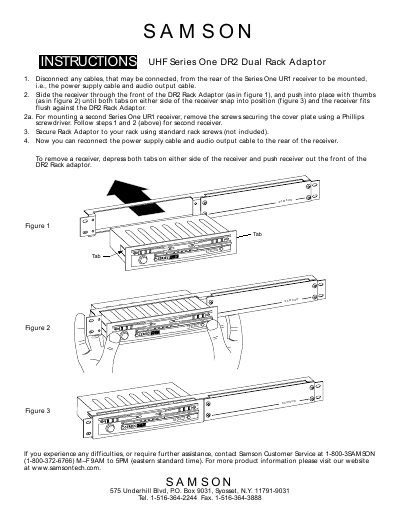
This guide provides instructions for installing the Samson UHF Series One DR2 Dual Rack Adaptor. Before mounting, disconnect any cables connected to the rear of the Series One URI receiver, including the power supply and audio output cables. Guide the receiver through the front of the adaptor and push until the side tabs snap into place, ensuring a flush fit.
To mount a second receiver, remove the screws securing the cover plate using a Phillips screwdriver before following the standard installation steps.
You must use a Phillips screwdriver to remove the screws that secure the cover plate.