
This document describes the features and functionality of the DS2153Q E1 single-chip transceiver, including complete E1 (CEPT) PCM-30/ISDN-PRI transceiver functionality, on-board line interface for clock/data recovery and waveshaping, jitter attenuator, line build-outs for 120Ω and 75Ω lines, frame formats, dual on-board two-frame elastic store slip buffers, control port, CAS signaling extraction and insertion, detection and generation of remote and AIS alarms, programmable output clocks, fully independent transmit and receive functionality, full access to Si and Sa bits, three separate loopbacks for testing, and large counters.
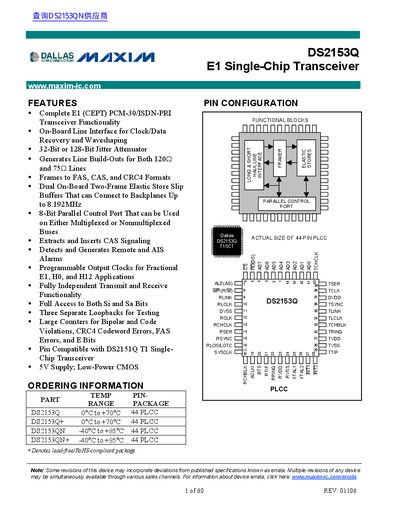
The DS2153Q is an E1 single-chip transceiver that contains all necessary functions for connection to E1 lines. It features on-board clock/data recovery circuitry that converts AMI/HDB3 E1 waveforms to a NRZ serial stream, automatically adjusting to twisted-pair cables up to 1.5km. The device generates G.703 waveshapes for both 75Ω and 120Ω lines.
| Interface Standard | E1 (CEPT) PCM-30/ISDN-PRI |
|---|---|
| Line Impedance Support | 75Ω and 120Ω |
| Jitter Attenuator Size | 32-Bit or 128-Bit |
| Supply Voltage | 5V |
| Package Type | 44 PLCC |
The device automatically adjusts to E1 twisted-pair cables from 0 to 1.5km.
No, it is pin compatible with the DS2151Q T1 transceiver but functions as an E1 transceiver.