
Midland WR-100 Weather Radio Owner's Manual

This document describes how to use the WR-100 outdoor antenna radio.
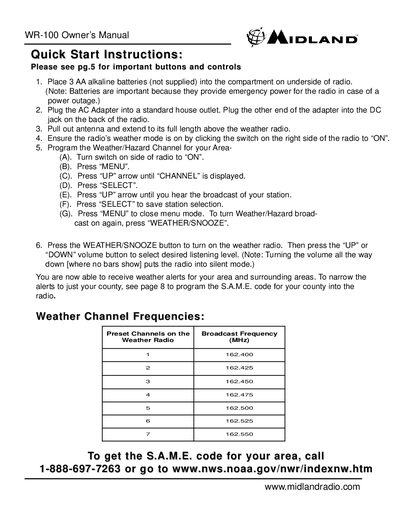

Midland WR-100 Weather Radio Owner's Manual - cover page
Brand
Midland
Category
Other
Document type
User Manual
Language
English
Pages
1
File format
PDF
File size
9 KB
Published
02 July, 2012
Updated
30 September, 2023
Model
WR-100
MD5 checksum
629DF15244F1BA968088328AF6D3167D

About this manual

This document is the Owner's Manual for the Midland WR-100 weather radio. It provides quick start instructions for setting up the device, including installing batteries and connecting the AC adapter. The guide details how to turn on the radio, select volume levels, and access the menu system.

What's inside

  • Quick Start Instructions
  • Battery Installation
  • AC Adapter Connection
  • Turning On the Radio
  • Menu Navigation
  • Programming Weather Channels
  • S.A.M.E. Code Setup
  • Weather Channel Frequencies

Frequently asked questions

What type of batteries are required for the radio?

The device requires three AA alkaline batteries to operate.

How long should the antenna be extended?

You must pull out the antenna and extend it to its full length above the radio.

Download PDF (9 KB)

More Midland Manuals


View all Midland manuals →