
This is an electronic piano manual, which introduces the functions and usage of the electronic piano.
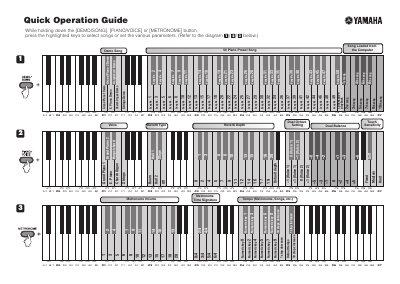
The document provides instructions for loading songs stored on a computer into the instrument. Users must hold down the [DEMO/SONG], [PIANO/VOICE], or [METRONOME] buttons while pressing highlighted keys to select from 50 piano preset songs or set various parameters.
Additionally, the guide details how to adjust the pitch of the instrument. By holding down specific left-most keys and other highlighted keys, users can change the pitch in approximately 0.2 Hz steps. The default pitch is stated as 440.0 Hz.
Hold down the [DEMO/SONG], [PIANO/VOICE], or [METRONOME] button and press the highlighted keys to select songs or set parameters.
The instrument is set to a pitch of 440.0 Hz.
Pressing the highlighted keys adjusts the pitch in approximately 0.2 Hz steps.