
This document is the user manual for HP PhotoSmart 215 digital camera, which introduces the camera's various features and characteristics, including taking pictures, storing, and playing back.
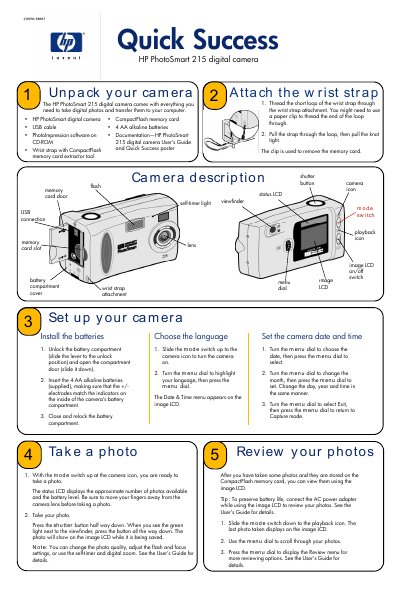
This guide walks you through unpacking the HP PhotoSmart 215 digital camera, installing the four AA alkaline batteries, attaching the wrist strap, and selecting the language. It also shows how to use the mode switch and menu dial to capture photos, review them on the image LCD, and adjust settings such as flash and self‑timer.
The second part covers connecting the camera to a PC via the supplied USB cable, installing the ArcSoft PhotoImpression software, and using it to download, edit, print, or email your photos. Tips for preserving battery life and using the optional AC power adapter are also included.
| Battery type | 4 AA alkaline batteries |
|---|---|
| Memory card type | CompactFlash |
Unlock the battery compartment, insert the four AA alkaline batteries making sure the polarity matches, then close and relock the compartment.
Connect the camera to the PC with the supplied USB cable, start the PhotoImpression software, and use the Acquire button to download all or selected photos.