
The S1D13xxx family of products is an operating system independent display solution for embedded markets, such as Mobile Communications, Hand-Held PCs, Office Automation, and other embedded devices. Support for the most popular RISC processors, in addition to all LCD panel types, provides the OEM with complete flexibility. EPSON innovative features such as EPSON Independent Simultaneous Display, SwivelView™, 2D Acceleration, “Picture-In-Picture Plus”, integrated USB Client, Digital Camera Interface, and Power Saving technology combine to provide an ideal display solution for a wide variety of applications.
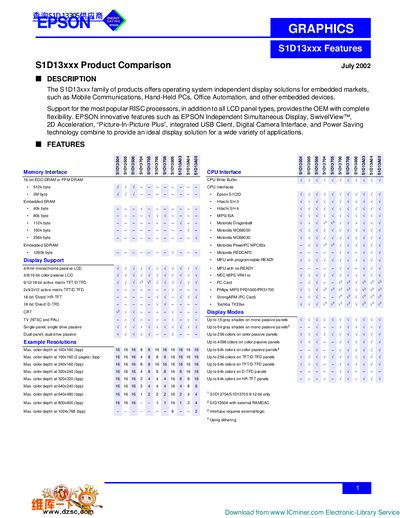
The S1D13xxx family provides operating‑system‑independent display solutions for embedded markets such as mobile communications, hand‑held PCs, and office automation. It supports a wide range of RISC processors and LCD panel types, giving OEMs flexibility in design.
Key features include Epson Independent Simultaneous Display, SwivelView™ rotation, 2D acceleration, Picture‑In‑Picture Plus, integrated USB client, digital camera interface, and power‑saving technologies. The document also lists memory interfaces, package options, voltage ranges, and color‑depth capabilities for various panel types.
| Memory Interface | 3 |
|---|---|
| Max Color Depth (160×160) | 16 bpp |
No, they are operating‑system‑independent display solutions.
Features include Epson Independent Simultaneous Display, SwivelView™, 2D Acceleration, Picture‑In‑Picture Plus, integrated USB client, digital camera interface, and power‑saving technology.
SwivelView operates from 3.0 V to 8.6 V.
The maximum color depth at 160×160 is 16 bits per pixel.