
This PDF file introduces the use of Logitech® WiLife Command Center software, including the Live and Playback main interfaces, and how to set up cameras and how to watch videos online.
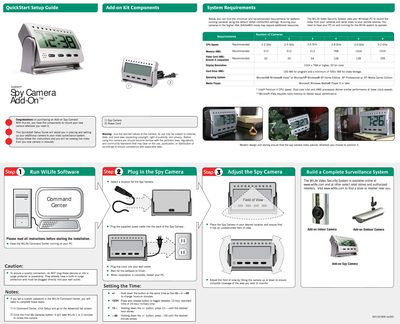
This guide walks you through setting up the Logitech Spy Camera Add-On kit, including connecting the camera, power cord, and configuring the WiLife Command Center software. Follow the three‑step process to run the software, locate the camera, and adjust the field of view for optimal coverage.
System requirements are listed to ensure smooth operation, covering CPU speed, memory, video card, display resolution, hard‑drive space, operating system, and media player. The guide also includes legal warnings, warranty information, and troubleshooting tips.
| CPU Speed | Recommended 2.2 GHz – 3.2 GHz |
|---|---|
| Memory (RAM) | Recommended 512 MB – 1024 MB |
| Video Card Memory | DirectX 9 compatible, recommended 32 MB – 256 MB |
| Display Resolution | 1024 × 768 or higher, 32‑bit color |
| Hard‑Drive Space | 100 MB for program, ≥500 MB for video storage |
| Operating System | Microsoft Windows Vista or Windows XP (Home, Professional, Media Center) |
| Media Player | Microsoft Windows Media Player 9 or later |
Yes, the guide warns that because of the camera’s discreet nature its use may be subject to national, state, and local laws regarding privacy, copyright, and publicity, and users should ensure compliance before recording.