
This document introduces the appearance and functions of the Dell OptiPlex GX620 mini tower computer.
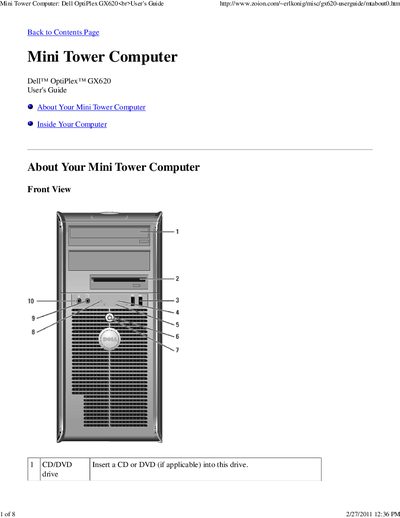
This guide introduces the Dell OptiPlex GX620 mini tower computer, describing the front and back panel connectors, indicator lights, and safety precautions. It explains the function of each port (USB, LAN, audio, video, serial, etc.) and how to use the power button and power‑light indicators.
The manual also details internal components such as the system board, CPU, memory slots, PCI/PCI‑Express slots, SATA connectors, and jumper settings. Instructions for opening the case, setting the manual voltage selector, and configuring passwords are included.
| USB version | 2.0 |
|---|---|
| Voltage selection switch setting | 115 V |
| Serial port designations | COM1, COM2 |
Press the power button; do not hold it for six seconds or longer, as that forces a hard shutdown.
Set the switch to the 115‑V position, even if the local AC supply is 100 V.