
This document provides an overview of the FEI/PHILIPS CM120 TEM (Transmission Electron Microscope) and the controls on the main panels. The CM120 is a transmission electron microscope with a maximum acceleration voltage of 120 kV. The left panel contains two important controls for users to know: beam intensity and wobbler for focusing. The right panel contains most of the CM120 controls, including the microscope on/off switch, vacuum system on/off switch, ultra high vacuum (UHV) indicator, high vacuum (HIVAC) indicator, high tension (HT) button, filament knob, emission indicator, computer monitor, spot size knob, magnification knob, focus knob, and beam shift controls. The microscope is controlled by an internal computer, and the computer monitor provides information about the microscope's condition. The computer is operated using green buttons on the screen, which can be used to select/change pages and set/change parameters.
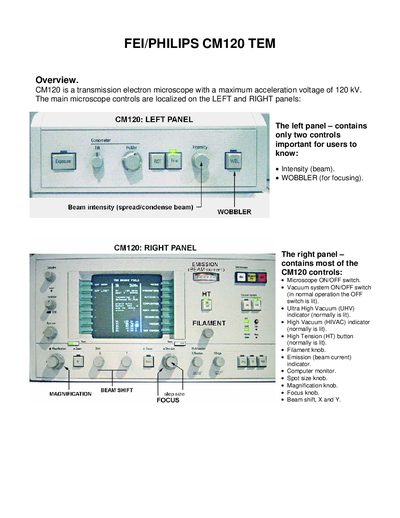
The manual describes the CM120 transmission electron microscope, its left and right control panels, and the integrated computer monitor that manages all microscope functions. It explains the meaning of indicators such as HT, UHV, HIVAC and shows how to navigate the screen pages using the green and Ready buttons.
Detailed procedures cover loading and unloading specimen grids, setting beam intensity, magnification, spot size, and using the EMMENU4 software to operate the CCD camera for image acquisition. Safety checks, vacuum requirements, filament handling, and end‑of‑session steps are also provided.
| Maximum acceleration voltage | 120 kV |
|---|---|
| High Tension (HT) indicator | always lit |
| Beam intensity control | left panel intensity knob |
| Spot size control | right panel spot size knob |
| Magnification control | right panel magnification knob |
Use the special tool to open the clamp, insert the grid into the carrier, close the clamp with the tool, and ensure the grid is oriented sample‑down before proceeding.
Rotate the filament knob a few turns clockwise; the filament will heat for 2‑3 minutes and a beep will indicate it is ready.