
This is a manual for the Casio fx-260 Solar calculator, which introduces the calculator's various keys and basic functions.
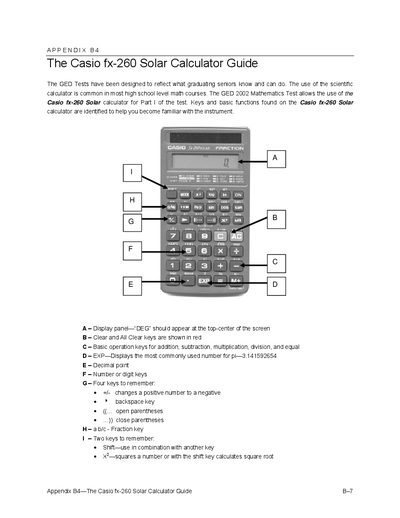
The Casio fx-260 Solar Calculator Guide provides step‑by‑step instructions for preparing and using the calculator during GED mathematics tests. It covers visual checks, mode settings, and basic operation procedures to ensure the device works correctly.
The document details key functions such as basic arithmetic, fractions, percents, squares, and square roots, and includes practice activities like upside‑down word puzzles and calculator tic‑tac‑toe games to help students become comfortable with the instrument.
| Display mode indicator | DEG |
|---|---|
| Exponent key displays pi | 3.141592654 |
| Power button function | Power On/All Clear |
Open the calculator, visually inspect the solar panel, screen, and keys, press the ON button, verify the display shows “DEG”, and press AC to clear any previous data.
Enter the number and then press the square key (x²) to obtain the result.