
This document describes the electrical specifications and environmental optical specifications of Noritake Itron VFD module GU126x64D-K610A4. The module has a supply voltage of 4.5-5.25V, a supply current of 410mA, and a display area of 57.45 x 28.65mm. It has a blue-green color illumination with a luminance of 800 cd/m2. The module can operate in temperatures ranging from -40°C to +85°C.
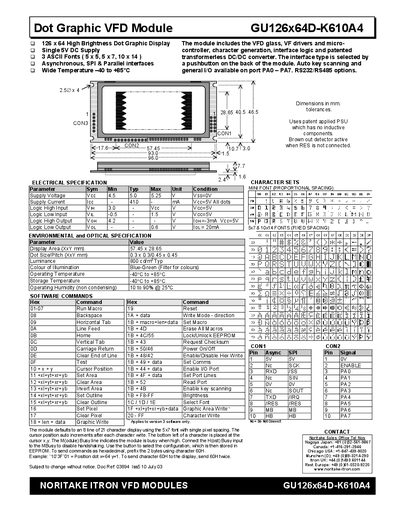
The GU126x64D-K610A4 is a 126 × 64 high‑brightness dot graphic VFD module with three font sizes, TTL‑compatible serial (synchronous and asynchronous) and parallel interfaces, and optional key‑scan capability. It operates from a 5 V supply and works in temperatures from –40 °C to +85 °C.
This manual covers electrical and environmental specifications, detailed software command set, interface selection, reset procedures, I/O control, text and graphic display methods, area commands, write modes, and macro programming, providing step‑by‑step instructions for configuring and using the module.
| Supply Voltage | 5.0 – 5.25 V |
|---|---|
| Supply Current | 410 mA |
| Logic High Input | 3.0 V |
| Logic Low Input | -0.5 – 1.5 V |
| Display Area | 57.45 × 28.65 mm |
| Dot Size / Pitch | 0.3 × 0.3 mm (0.45 × 0.45 mm optional) |
| Luminance | 800 cd/m² |
| Colour of Illumination | Blue‑Green |
| Operating Temperature | -40 °C to +85 °C |
| Operating Humidity (non‑condensing) | 10 %–90 % @ 25 °C |
Issue the Reset command (19H) or apply a low‑level signal to the /RES pin; the module will clear the display and restore default settings.