
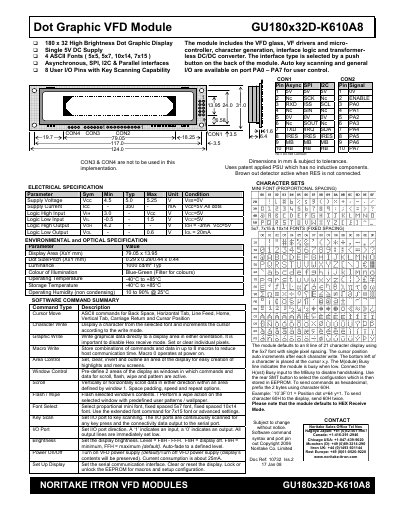
The GU180x32D-K610A8 is a high‑brightness 180 × 32 dot‑matrix VFD display that supports four ASCII fonts, proportional mini fonts, and a range of interface options including asynchronous serial, SPI, I²C and parallel. It includes built‑in key‑scan I/O pins, a programmable EEPROM for macros, and a transformer‑less DC/DC converter.
The manual details how to select the communication interface, configure serial parameters, use the extensive software command set (cursor movement, graphic write, window control, macros, brightness, etc.), and provides the full electrical, environmental and optical specifications needed for integration and troubleshooting.
| Supply Voltage (Vcc) | 4.5 V – 5.25 V |
|---|---|
| Supply Current (Icc) | ≤ 350 mA |
| Logic High Input (V_IH) | 3.0 V – Vcc |
| Logic Low Input (V_IL) | -0.5 V – 1.5 V |
| Logic High Output (V_OH) | 4.2 V (typ) |
| Logic Low Output (V_OL) | 0.6 V (typ) |
| Display Area | 79.05 mm × 13.95 mm |
| Dot Size / Pitch | 0.29 mm × 0.29 mm (horizontal) / 0.44 mm × 0.44 mm (vertical) |
| Luminance | 1000 cd/m² (typ) |
| Operating Temperature | -40 °C to +85 °C |
| Operating Humidity | 10 % to 90 % (non‑condensing, @ 25 °C) |
Send the Brightness command (1BH + level) where the level ranges from F8H (off) to FFH (maximum).
The module supports asynchronous serial, SPI, I²C, and parallel interfaces, selectable via a push‑button on the rear of the module.
Apply a low‑level signal to the /RES pin; the module clears the display, restores communication settings, and returns to power‑on defaults.