
This document provides a list of service stations of Sanyo Company in Taiwan, including the units, phone numbers, and addresses of each station.
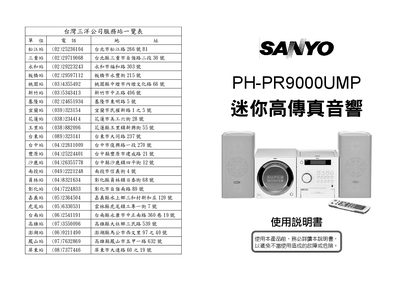
This manual covers the Sanyo PH-PR9000UMP micro hi‑fi system, describing its main unit, sub‑woofer, remote control, and supported media functions. It is intended for end users to safely install, operate, and maintain the product.
Key sections include safety warnings, detailed specifications, step‑by‑step operation of the timer, USB/SD/MMC playback, preset equalizer, mute and sleep functions, maintenance procedures, and a troubleshooting guide for common issues such as no sound or disc playback problems. This manual is written in Chinese.
| Power Supply (Main Unit) | AC110V 60Hz |
|---|---|
| Remote Control Power Source | DC3V (AAA‑size) x2 |
| Maximum Output Power (Main Unit) | 200 W (PMPO) |
| Power Consumption (Main Unit) | 30 W |
| Speaker Power (Main Unit) | 10 W (high) / 10 W (low) |
| Frequency Range (Radio) | MW 522‑1620 kHz, FM 87.5‑108 MHz |
| Frequency Response (Audio) | 125 Hz‑20 kHz |
| Signal‑to‑Noise Ratio | 30 dB |
| Unit Dimensions | 170 mm (W) × 224 mm (D) × 174 mm (H) |
| Weight (Main Unit) | 4.4 kg |
| Maximum Output Power (Sub‑Woofer) | 300 W (PMPO) |
| Sub‑Woofer Speaker Power | 30 W |
| Sub‑Woofer Frequency Response | 20 Hz‑130 Hz |
| Sub‑Woofer Dimensions | 170 mm (W) × 260 mm (D) × 170 mm (H) |
| Weight (Sub‑Woofer) | 3.4 kg |
Reset the product by reconnecting the power source, which will resume normal operation.
Check that the speaker connections are secure and adjust the volume to an audible level.
Wipe the shiny side with a damp cloth, avoid using solvents or record cleaners, and remove fingerprints before insertion.