
This document is a simple installation guide for the 661MX series motherboard from Foxconn. The motherboard supports Socket 478 packaged Intel Pentium 4 and Celeron processors, and features a 184-pin memory expansion slot, ATX power connector, ATA 66/100/133 ID E connector, etc.
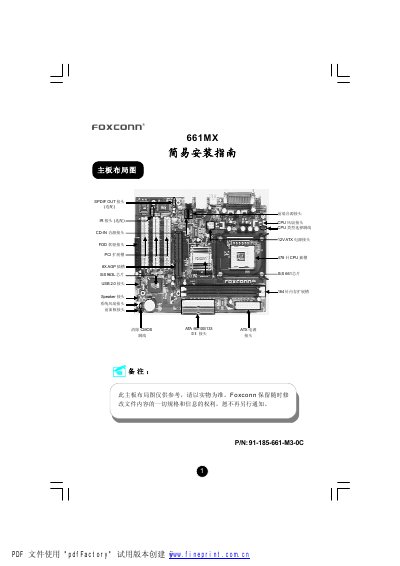
This guide covers the physical layout of the Foxconn 661MX motherboard, detailing each connector such as PS/2 ports, serial, parallel, VGA, USB 2.0, audio jacks, front‑panel headers and optional ports like Ethernet, SPDIF and IR. It also lists the required accessories and explains how to install the CPU, memory modules and configure jumpers.
Instructions for clearing the CMOS, selecting the CPU type via jumper J2, connecting fans, audio devices and front‑panel switches are included, along with steps to load the BIOS optimized defaults and install drivers from the supplied Foxconn Utility CD. This manual is written in Chinese.
| CPU socket | Socket 478 |
|---|---|
| Supported CPUs | Intel Pentium 4 (Willamette/Northwood/Prescott) and Celeron (Willamette/Northwood) |
| Memory slots | 2 x 184‑pin DIMM |
| Supported memory | DDR 266/333/400 up to 1 GB per module |
| PCI slots | 8X PCI slot |
| USB ports | 4 x USB 2.0 ports |
| VGA port | Optional VGA port |
| SPDIF output | Optional SPDIF_OUT |
It supports Socket 478 Intel Pentium 4 (Willamette, Northwood, Prescott) and Socket 478 Intel Celeron (Willamette, Northwood) processors.
The board has two 184‑pin DIMM slots that accept DDR 266/333/400 memory modules up to 1 GB per module (128‑1024 MB).
A Foxconn Utility CD is included; insert it into a CD drive and follow the on‑screen prompts to install the drivers.