
661FX/648FX4MR-ES motherboard quick installation guide, introduces the layout, interface, back panel, object list and other information of the motherboard.
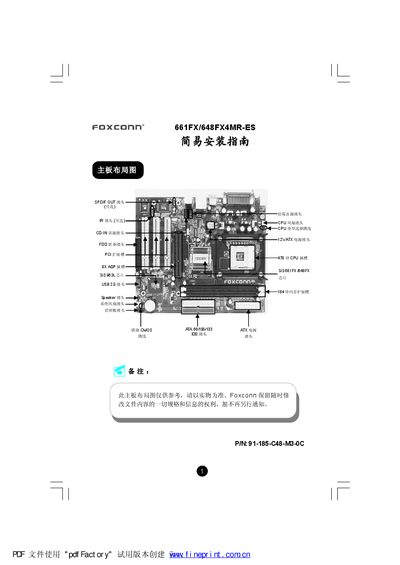
The Foxconn 661FX/648FX4MR-ES motherboard supports Socket 478 CPUs, DDR memory up to 2 GB, and includes integrated audio, video, USB, and networking interfaces. It is designed for easy installation with detailed connector diagrams and jumper settings.
The manual covers CMOS clearing, CPU jumper configuration, fan connections, front‑panel audio wiring, USB and IRDA ports, SPDIF output, speaker wiring, BIOS setup, and the Foxconn Utility CD for driver installation. Each section provides step‑by‑step instructions and pin‑out tables for proper assembly and troubleshooting. This manual is written in Chinese.
| CPU Socket | Socket 478 |
|---|---|
| Supported CPUs | Pentium (Willamette/Northwood/Prescott) and Celeron |
| Memory Slots | 2 DIMM slots, 184‑pin DDR |
| Supported Memory Types | DDR 266 MHz, DDR 333 MHz, DDR 400 MHz |
| Maximum Memory Capacity | 2 GB |
| Audio Codec | Realtek ALC655 |
Turn off power, short pins 1 and 2 of the CMOS jumper, then restore pins 2 and 3 to normal.
It supports Socket 478 Pentium (Willamette, Northwood, Prescott) and Celeron processors with FSB 400 MHz, 533 MHz or 800 MHz.
The board has two 184‑pin DIMM slots for DDR 266/333/400 memory, up to a total of 2 GB.
Short pins 5, 6, 9 and 10 on the front‑panel connector to route the signal to the rear audio ports.