
ViewSonic NX2240W Television Quick Start Guide

The document is a quick start guide for ViewSonic products, providing information about the features and characteristics of the NX1940 and NX2240 televisions.
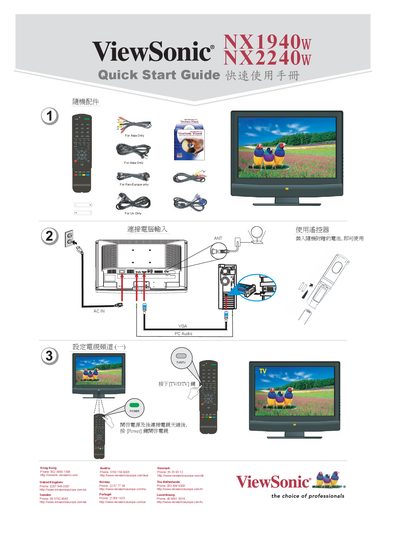

ViewSonic NX2240W Television Quick Start Guide - cover page
Brand
ViewSonic
Category
Television
Document type
Quick Start Guide
Language
English
Pages
2
File format
PDF
File size
2.2 MB
Published
20 March, 2012
Updated
28 September, 2023
MD5 checksum
37701A67122FA5DB412BBD1AB39E4F56

About this manual

This Quick Start Guide helps you get the ViewSonic NX2240W television up and running quickly. It covers power connection, video input options such as VGA and PC audio, and basic menu navigation.

Regional support phone numbers and website links for Asia, Europe and other territories are listed, allowing you to contact local ViewSonic service centers for assistance.

What's inside

  • Quick Start Guide
  • Program Settings
  • Colour System
  • Sound System
  • Frequency
  • Loudness
  • Regional Support Contacts

Specifications

Colour systemPAL-443
Sound systemDE

Frequently asked questions

How can I contact ViewSonic support in the United Kingdom?

Call Phone: 0207 949 0307 or visit the UK ViewSonic website.

Download PDF (2.2 MB)

More ViewSonic Manuals


View all ViewSonic manuals →