
This file is the user manual of the Canon EF series lens. It introduces the features and characteristics of the series of lenses, installation and removal methods, setting focus mode, infinity distance mark, infrared indication mark, filter and other information
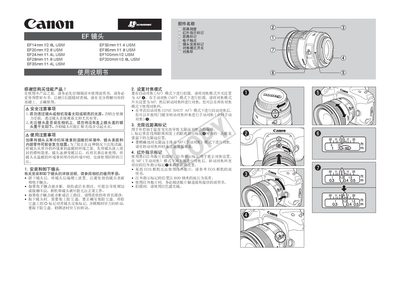
This manual explains how to safely use the Canon EF14mm f/2.8L USM lens, including precautions against viewing the sun, handling condensation, installing and removing the lens, and setting focus modes. It also covers the use of infrared indicator marks, filters, and lens hoods.
A detailed specifications table lists angle of view, minimum aperture, filter size, weight, and minimum focusing distance for the EF14mm f/2.8L USM and other EF lenses covered in the document. This manual is written in Chinese.
| Filter size | 77 × 89 mm |
|---|---|
| Weight | 560 g |
| Minimum focusing distance | 0.25 m |
No. Looking at the sun or bright light sources through the lens can damage your eyesight.
Place the lens in a sealed plastic bag before moving it, allowing it to warm up or cool down gradually while still sealed.
Align the red dot on the hood with the red dot on the lens front, then rotate the hood in the indicated direction until they line up.