
This document is a simple Chinese manual that provides instructions on how to operate a mobile phone named SH009. It includes instructions on how to turn on and off the power, switch language, make and receive calls, save and view phonebook, use the camera, and other functions.
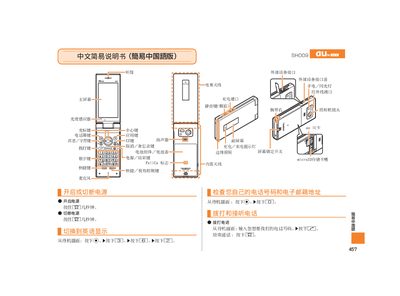
This manual explains how to operate the Sharp SH009 mobile phone, covering essential functions such as dialing, answering calls, and using the built‑in camera. It is written in simple steps for easy reference.
Key topics include saving contacts, recording video, taking photos, setting mute mode, and using voice memos, as well as information about external interfaces like the microSD card slot and built‑in antenna. This manual is written in Chinese.
| Memory Card Slot | microSD |
|---|---|
| Charging / Call Indicator Light | LED |
When the phone rings, press the [忆] button to answer.
During video recording, press the designated button to pause; press it again to switch to photo mode, and vice‑versa.
From the standby screen, hold the E5 button for a few seconds to enable mute; repeat the same steps to cancel mute.