
This document is the user guide of Philips mobile phone, which introduces the functions, usage methods and common problems of the mobile phone
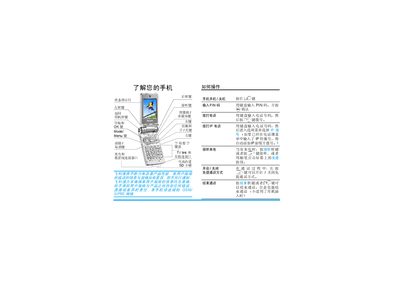
This manual explains how to install the SIM card, power the phone on and off, and configure basic settings such as date, time, and screen calibration. It also describes the touch‑screen operation, menu navigation, and the functions of the status indicator light.
Additional sections cover phone settings, ringtone selection, battery handling, SD‑card usage, and a troubleshooting guide for common issues. This manual is written in Chinese.
| Battery type | standard battery |
|---|---|
| SD card support | Yes |
| Touch screen | Yes |
Press the [2] key (hold longer if the phone is charging) to power on the device.
With the phone turned off, remove the back cover, insert the SIM card with the metal side down and the angled corner to the left, then reattach the cover.
Select the calibration option from the menu and tap the five on‑screen markers within 10 seconds as instructed.
The light changes color to show power status, charging, incoming calls, and low battery warnings.