
Introduces the cleaning fluid filling methods of Jet Clean I and Jet Clean II washing machines
This document provides step‑by‑step instructions for refilling the HQ200 cleaning solution used in Jet Clean washing machines. It covers two machine types, Jet Clean I and Jet Clean II, and explains how to correctly load the cleaning fluid.
For Jet Clean I, remove the fluid container, take off the dosing cap, open the bottle, fill the container with HQ200 cleaning fluid, reseal the cap and reinstall the container. For Jet Clean II, press the release buttons on both sides, lift the machine, unscrew the dosing cap, fill the cleaning chamber with HQ200 up to the MAX mark, and place the machine back onto the chamber.
| Cleaning fluid model | HQ200 |
|---|
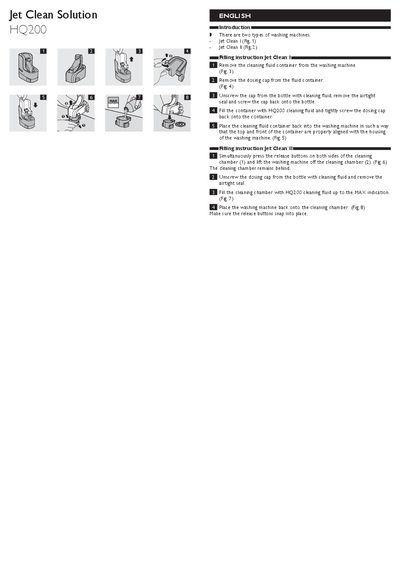
Remove the container, take off the dosing cap, open the bottle, fill the container with HQ200 cleaning fluid, tightly screw the dosing cap back on, and reinstall the container in the machine.
Press the release buttons on both sides, lift the machine, unscrew the dosing cap, fill the cleaning chamber with HQ200 cleaning fluid up to the MAX indication, then place the machine back onto the chamber.