
This Quick Start Guide is only for quick reference. For more details on advanced functions, you can refer to your user’s manual which you will find as pdf document on the CD-ROM. Before you can read the file, please download the free software Acrobat Reader from our website www.rollei.de, English, Service, download.
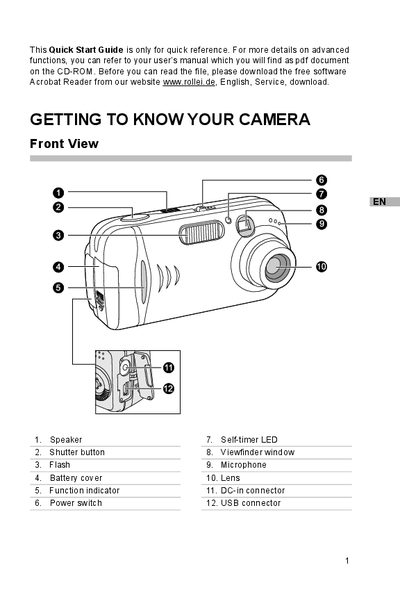
This guide provides brief, step‑by‑step instructions for getting a Rollei digital camera up and running. It covers basic hardware setup such as attaching the strap, installing batteries, and inserting an SD memory card, as well as configuring date and time settings.
It also explains how to capture photos or video, view and delete images on the LCD monitor, and transfer recorded files to a Windows or Mac computer using the supplied USB driver and software installers (PhotoSuite, PhotoVista).
| Memory card type | SD |
|---|---|
| USB interface | USB connector |
Thread the small loop of the strap through the strap eyelet on the camera, then pull the large loop through the small loop until the strap is firmly secured.
Make sure the camera is turned off, slide the battery cover, insert the batteries with the correct polarity (+ or -), and close the battery cover firmly.
Install the USB driver (Windows 98 only), connect the camera to the computer with the USB cable, turn the camera on, then copy the files from the camera’s removable‑disk folder to your computer.