
MTC35-F30 humidity controller is a small humidity controller with 1-way humidity input signal, 1-way relay output and 1-way relay alarm signal, with simple operation, high reliability and low price, which is widely used in various environmental humidity control systems.
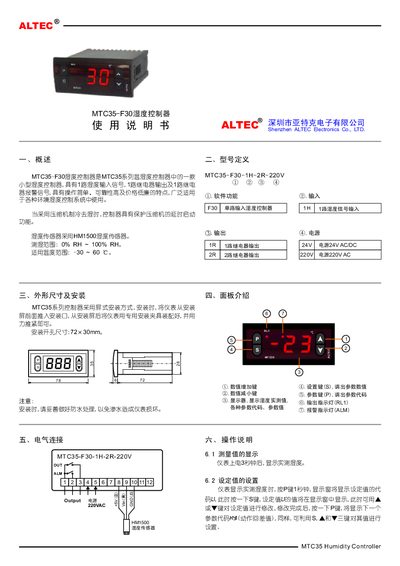
The manual introduces the MTC35-F30 humidity controller, a compact unit in the MTC35 series with one humidity input, one temperature input, and relay outputs for control and alarm. It emphasizes simple operation, high reliability, and low cost, making it suitable for a wide range of environmental humidity control systems.
It details screen‑type mounting, electrical connections (24 V AC/DC or 220 V AC power), wiring of the HM1500 humidity sensor, and how to set parameters such as setpoint, alarm limits, and output behavior. Technical data, fault codes, and troubleshooting steps are also included. This manual is written in Chinese.
| Humidity measurement range | 0% RH ~ 100% RH |
|---|---|
| Temperature measurement range | -30 °C ~ 60 °C |
| Power supply options | 24 V AC/DC or 220 V AC |
| Dimensions (W×H×D) | 78 mm × 35 mm × 78 mm |
| Sampling period | 125 ms |
| Humidity sensor type | HM1500 |
The controller can measure humidity from 0% RH up to 100% RH.
It can be powered from either a 24 V AC/DC source or a 220 V AC source.
Press the P key for 1 second to display the setpoint code, then use the S key and the adjustment keys to modify the value.
The controller supports four alarm modes, selectable via the alarm mode parameter.