
This document introduces the user manual of Lenovo Wanquan R630 6004 server system and the usage of the system configuration program. It mainly describes the functions and usage of various configuration programs, as well as the POST process of the system. It also introduces the commonly used combination keys and the usage of BIOS setup program.
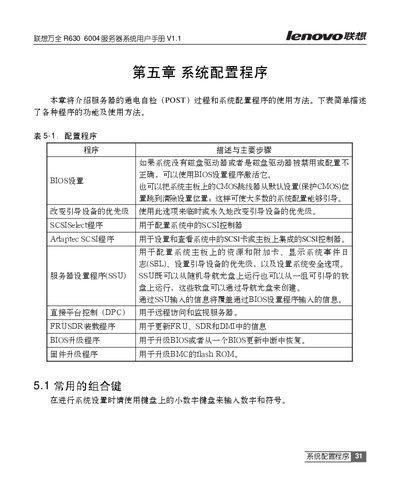
This manual describes the server's system configuration procedures, including the Power‑On Self Test (POST), BIOS setup options, and detailed menus for processor, memory, and PCI devices. It explains how to change boot device priority, configure SCSI controllers, and adjust advanced chipset settings.
The document also covers the Direct Platform Control (DPC) console, which offers an emergency management port for remote monitoring, power‑on, and file transfer. Instructions for using EMP mode, redirect mode, and service‑partition mode are provided, along with troubleshooting tips for BIOS redirection and CMOS clearing. This manual is written in Chinese.
| System Time format | HH:MM:SS |
|---|---|
| Hard Disk Pre‑delay | 3~30 seconds |
| Processor speed setting | Displays CPU frequency |
| L2 Cache size | Displayed per processor |
Press the
Use the BIOS option "Change boot device priority" to modify the order permanently or temporarily.
The DPC (Direct Platform Control) console provides an emergency management port (EMP) for remote monitoring, power‑on, and file transfer.
Move the motherboard CMOS jumper from the default (protect CMOS) position to the clear position.