
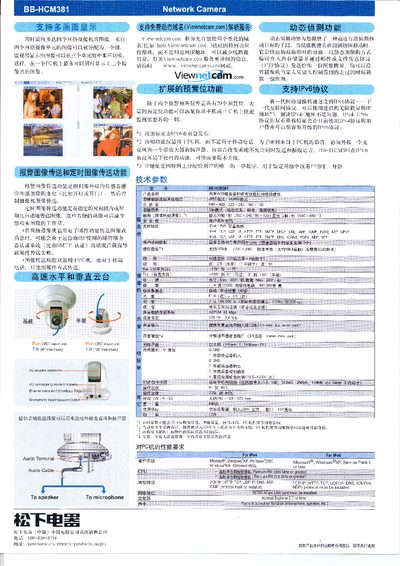
The BB-HCM381 can monitor up to four network cameras simultaneously, displaying up to twelve image points on a PC. It supports image transmission, scheduled transmission, and motion‑triggered alerts, allowing users to reduce the effort of retrieving images.
Technical details include resolution options of 640×480, 320×240 and 160×120, a maximum frame rate of 30 fps, pan/tilt ranges of 350° and 90°, and support for both IPv4 and IPv6 protocols. Power is supplied via a 10.5‑13.5 V DC input, and audio can be connected through microphone and speaker terminals. The system requires Windows 98SE or later with a Pentium 800 MHz processor or greater. This manual is written in Chinese.
| Maximum simultaneous cameras | 4 |
|---|---|
| Supported resolutions | 640×480, 320×240, 160×120 |
| Maximum frame rate | 30 fps |
| Pan range | 350° |
| Tilt range | 90° |
| DC power input | 10.5‑13.5 V |
| Supported IPv4 protocols | TCP, UDP, IP, HTTP, FTP, SMTP, DHCP, DNS, ARP, ICMP, POP3, NTP, UPnP |
| Supported IPv6 protocols | TCP, UDP, IP, HTTP, FTP, SMTP, DNS, ICMPv6, POP3, NDP, NTP |
| Operating system requirement | Windows 98SE or later, Pentium 800 MHz or greater |
The BB-HCM381 can monitor up to four network cameras simultaneously, with up to twelve image points displayed on a PC.
It supports three resolutions: 640×480, 320×240, and 160×120.
The camera can pan up to 350° and tilt up to 90°.
It supports IPv4 protocols such as TCP, UDP, IP, HTTP, FTP, SMTP, DHCP, DNS, ARP, ICMP, POP3, NTP, UPnP, and IPv6 protocols including TCP, UDP, IP, HTTP, FTP, SMTP, DNS, ICMPv6, POP3, NDP, NTP.