
This document introduces the features and characteristics of the digital timer H5CX, including bright and easy-to-read LCD display, color change function, simple operation with digit keys, basic settings with toggle switches, NPN/PNP input, and waterproof structure.
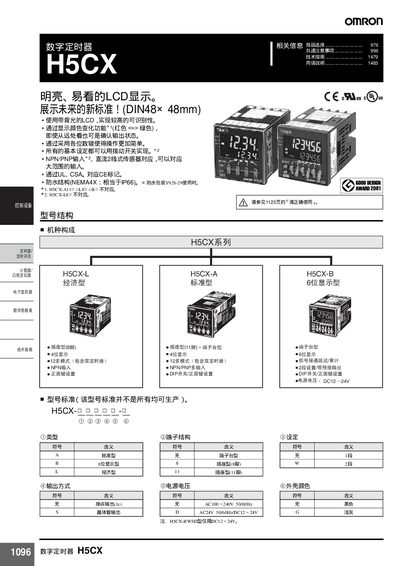
This manual describes the features, wiring, and safety requirements of the Omron H5CX digital timer series. It includes information on the LCD display, backlight, color‑change function, and various mounting options such as terminal‑block, screw‑terminal, and plug‑in types.
The document also covers electrical specifications, installation procedures, and troubleshooting tips. It provides guidance on input voltage, output voltage, power consumption, temperature limits, and protection ratings (NEMA 4/IP66). Safety precautions and recommended wiring diagrams are included to ensure reliable operation in industrial environments. This manual is written in Japanese.
| Input voltage | AC100‑240 V 50/60 Hz |
|---|---|
| Output voltage | DC12‑24 V |
| Power consumption | ≈2.4 W |
| Operating temperature | -10 °C to +55 °C |
| Protection rating | NEMA 4 / IP66 |
The timer operates from AC100 V to AC240 V at 50/60 Hz.
It provides a DC output of 12 V to 24 V.
The device can be used from –10 °C up to +55 °C.
It is rated NEMA 4/IP66, suitable for waterproof installation.