
This is an installation manual for the Canon imageCLASS D323/D383 multifunctional all-in-one machine. The manual introduces how to install paper boxes, original document trays, telephone lines, power cords, etc., and how to select the language on the LCD screen, install ink cartridges, etc.
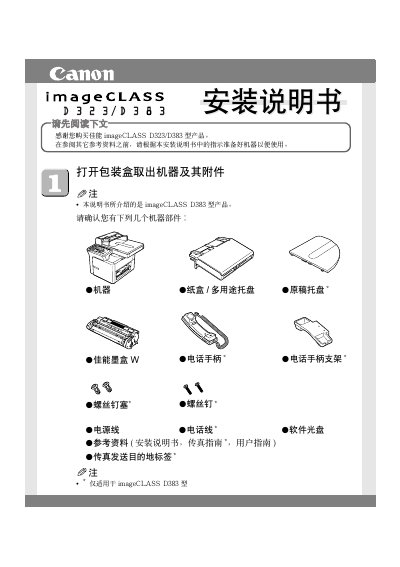
This manual provides step‑by‑step instructions for preparing and installing the Canon imageCLASS D323/D383 printer. It starts with unpacking the unit, removing shipping materials, and installing the paper tray and optional document feeder.
Subsequent sections cover connecting the power cord, selecting the LCD language, installing the ink cartridge, loading paper, and installing the CARPS driver software on Windows 98/Me/2000/XP. The guide also explains how to access the electronic user guide on the supplied CD. This manual is written in Chinese.
| USB data cable length | less than 5 m |
|---|---|
| Power cord connection point | left‑side power socket |
| Supported operating systems | Windows 98/Me/2000/XP |
| Paper size adjustment | width and length guides |
A USB data cable shorter than 5 m is required; the cable is not included with the printer.
Remove the cartridge from its protective bag, shake it 5‑6 times, pull off the seal tape, and insert it aligning the tabs with the printer’s guides.
Press the Help or P (+) key, choose the desired language, and confirm with the OK key.
Insert the supplied CD, run the installer (CSplash.exe), follow the wizard, and choose the USB connection option.