
Haier digital photo frame quick guide, introduces the product's power on and off, button instructions, remote control use, main menu use, movie playback, music playback, picture browsing and other functions
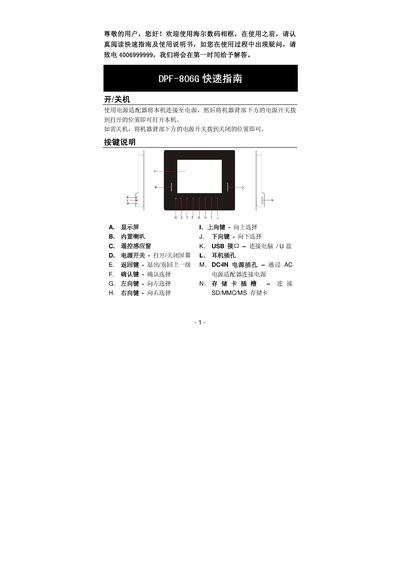
The guide begins with safety reminders and instructions for connecting the power adapter and turning the frame on or off using the rear power switch. It also explains the button layout, remote control functions, and how to replace the remote’s CR2025 battery.
The main menu lets you choose between MUSIC, PHOTO, MOVIE, and other modes. You can select files from a USB drive, SD/MMC/MS card, or internal memory, then use the ENTER key to start playback, adjust volume, rotate or zoom images, and run a slideshow. Basic file operations such as copy, delete, and folder navigation are also covered. This manual is written in Chinese.
| Display size | 8‑inch TFT‑LCD |
|---|---|
| Resolution | 800 × 600 pixels |
| Image formats | JPG, BMP |
| Audio format | MP3 |
| Video formats | AVI, MP4 |
| Supported memory cards | SD, MMC, MS cards |
| USB support | USB flash drive |
Connect the power adapter, then flip the power switch at the back of the unit to the ON position to power up, or to the OFF position to shut down.
Remove the protective plastic tab, press the latch to open the battery compartment, insert a CR2025 button cell, and push the compartment back into place.
From the main menu select MUSIC, PHOTO, or MOVIE using the corresponding buttons, then press ENTER to start playback of the chosen media.