
Using MPMeisterV to record video
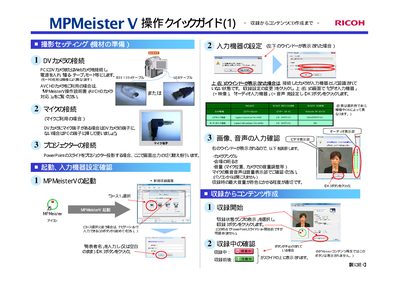
This guide explains the steps to set up the MPMeister V system for presentations. It covers connecting DV/AVCHD cameras via IEEE1394 or USB, attaching a microphone, and linking a projector for slide display.
After the devices are recognized, you can start recording, edit the captured content, and export the final video to a CD‑R. The guide also includes tips for adjusting audio levels and removing unwanted sections before saving. This manual is written in Japanese.
| Supported camera interfaces | IEEE1394 (FireWire) and USB |
|---|---|
| Supported video devices | Panasonic NV‑G5150, Logitech QuickCam Pro 4000, JVC DV device |
| Supported microphone | Logitech Microphone (Pro 4000) |